
Listen Audiobook Player
acme-android.comMusic & Audio
4.41.12K Reviews
- Version
- Varies With Device
- Installs
- 100.00K
- Age Rating
- Everyone 10+
Screenshots
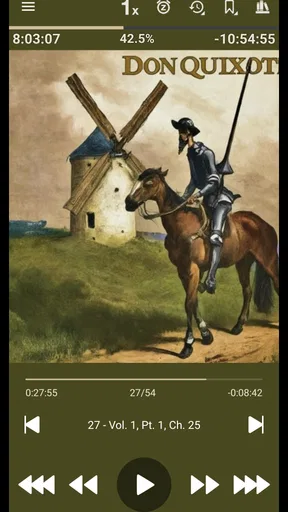
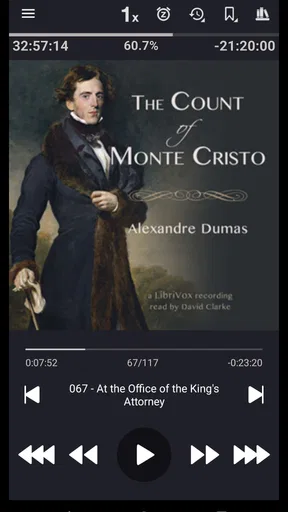
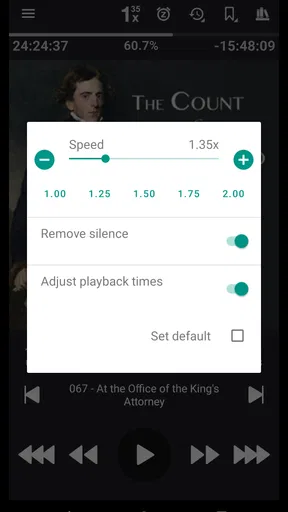
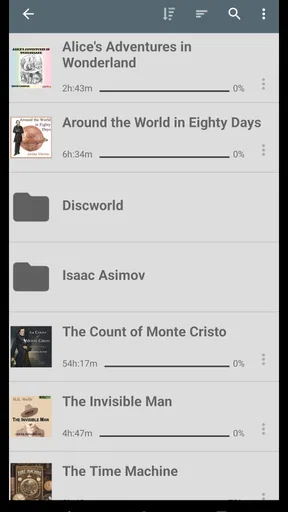
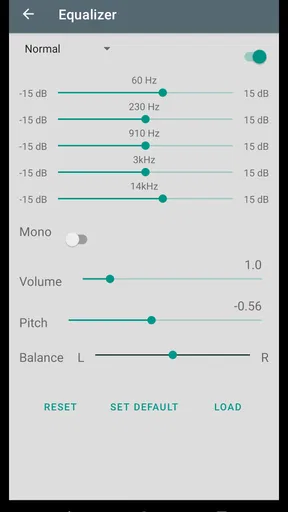
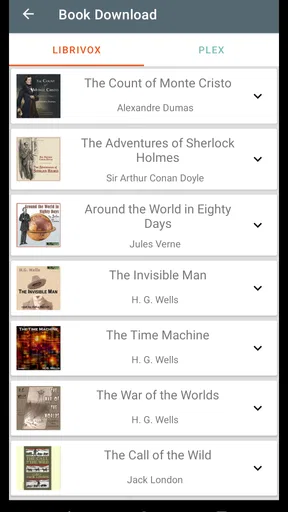
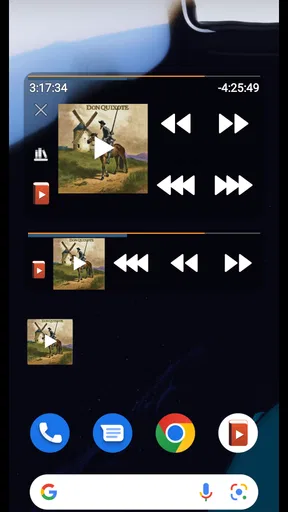
Our Review of Listen Audiobook Player
 Analysis by Appyee
I’m usually looking for an audiobook player when I already have a book ready to go but don’t want to lose my place, hunt through folders, or fumble with controls while I’m doing something else. Listen Audiobook Player is built around that listening routine rather than trying to be a general music app, and that focus is what makes it appealing to me. It’s a paid Android app from acme-android.com, priced at $1.99, with a 4.7 average from around 5,400 ratings and over 100,000 installs. Those figures suggest it has found a steady audience, but the more useful question is whether its approach suits the way you actually listen.
Start with the library you already have
My first practical question with any dedicated audiobook app is how much work it takes to get from an audio file to a book I can resume tomorrow. Listen Audiobook Player is intended for personal audiobook libraries, so it makes the most sense when you already have files on your device or stored elsewhere. The app’s store summary describes a feature-rich player that is easy to use, and in practice the appeal is less about a dramatic setup process than having playback tools designed around longer listening sessions.
The Play Store marks it for Everyone 10+, and it has been available since July 16, 2012. That long history is useful context for an app with a focused job: it is not a new streaming service trying to replace every audio app on your phone. I’d consider it when I want a player for books I manage myself, rather than a subscription catalog where browsing and purchasing are part of the experience.
Move from a file to a listening routine
Once a book is available in the library, the everyday workflow is straightforward: choose it, start playback, and use the controls to make the narration fit the moment. Variable speed is more than a novelty for me. A slightly quicker pace can help with a narrator who speaks slowly, while a slower setting can make dense material easier to follow. I wouldn’t assume that faster is always better, though; with unfamiliar names or a complicated plot, backing off the speed can save rewinds and frustration.
Bookmarks and notes also make more sense in a book player than they might in a basic music app. If I’m listening to a nonfiction title and want to return to a passage, a bookmark gives me a concrete place to revisit. A brief note can preserve why I marked it, which is useful if I’m listening while walking and can’t stop to write a thought elsewhere. For fiction, I’d use the feature more selectively, perhaps to keep track of a scene I want to discuss later rather than interrupt the story every few minutes.
The sleep timer supports another common routine: starting a chapter in bed without letting playback run indefinitely after I drift off. I’d set it before settling in, then keep the phone within reach in case I want to adjust the timer or pause. That small habit matters because a timer is most helpful when it prevents the next listening session from starting several chapters ahead of where I remember stopping.
Keep control when the phone is elsewhere
Listening rarely means staring at the player screen. The lock screen controls and widget support described for the app let me handle basic playback without repeatedly opening it. That is particularly useful when the phone is in a pocket, on a desk, or charging across the room. Chapter and track navigation also fits audiobook use better than relying only on a music-style scrub bar, where a small accidental drag can put you far from the passage you wanted.
There is a handoff to think about when your listening moves between places. If I pause at home and resume later during a commute, the useful outcome is not an elaborate interface; it is having the book ready and being able to continue without reconstructing my place. I’d make a habit of pausing through the app’s controls instead of force-closing it mid-playback, especially before switching to another audio task. That is a sensible way to reduce confusion in any file-based listening routine, even when the player itself is simple.
Where the focused approach pays off—and where it doesn’t
Compared with a general music player, Listen Audiobook Player is aimed at the specific needs of long-form narration: adjustable speed, bookmarks, notes, a sleep timer, and controls suited to resuming a book. A streaming audiobook service is more convenient if you want to search a large catalog and start listening without organizing files. A basic file player may be enough if you only listen occasionally and do not care about book-oriented tools. I’d choose this app when I value control over a personal collection more than built-in discovery.
That distinction is also the main trade-off. A dedicated player can make listening to owned files feel organized, but it is not automatically the right answer for someone who expects every book to appear in a subscription library or wants the app to handle the entire process of finding and obtaining titles. Before paying, I’d think about where my audiobooks come from and whether I’m comfortable managing those files. The app is for Android, so iPhone users should look for an iOS alternative rather than assume this purchase will carry over.
First Impressions and Setup
Downloading Listen Audiobook Player from the Play Store was a breeze, and it installed without a hitch. The interface is clean and straightforward, which I appreciate. I've seen my fair share of apps that try too hard with flashy designs, but this one keeps it simple, focusing on functionality over flair.
Upon opening the app, you're greeted with a quick tutorial. It's handy, especially if you're new to audiobook players. Setting up my library was intuitive. The app allows you to import audiobooks from various sources, including your device storage and cloud services. I uploaded a few books from my Google Drive, and the process was seamless.
Features that Stand Out
What really sets Listen Audiobook Player apart are its features tailored for audiobook listeners. Let's dive into some of the highlights:
- Customizable Playback Speed: Whether you like to speed things up or slow them down, the app has you covered with its adjustable playback speed. I found this especially useful for getting through lengthy narrations.
- Bookmarks and Notes: I often jot down thoughts or memorable quotes, and this feature lets me do just that. You can easily mark your place and add notes, which are accessible anytime.
- Sleep Timer: Falling asleep to a good book is a pleasure, not a problem, thanks to the sleep timer. Set it up, and you won't have to worry about losing your place.
User Experience
Using the app is a joy. The playback controls are intuitive, allowing easy navigation through chapters and tracks. The lock screen controls and widget support are nice touches, making it easy to control playback without diving back into the app every time.
One of my favorite aspects is the level of customization available. You can tweak everything from the interface color scheme to the playback notifications, making the experience truly yours. It's like having a personal audiobook assistant that adapts to your preferences.
Audio Quality and Compatibility
The audio quality doesn't disappoint either. Whether it's a soft-spoken narrator or an action-packed scene, the sound is crisp and clear. The app supports a wide range of audio formats, so you won't have to worry about compatibility issues. I've thrown MP3, M4B, and OGG files at it, and it handled them all like a champ.
Match the player to the day
A realistic test is a weekday with several short gaps rather than one uninterrupted evening. I might start a novel while getting ready, pause it before leaving, and continue on the way to an appointment. Later, I could switch to a nonfiction title at home and use a bookmark to preserve a useful passage. In that kind of day, the app’s value comes from reducing small interruptions: playback speed can suit the narrator, controls are accessible away from the main screen, and notes give a reason to return to a marked spot.
For a listener who mainly wants a story as background while doing chores, the simpler setup may be enough. For someone studying from spoken material, notes and bookmarks are more compelling, but I’d still avoid trying to capture every idea while moving around. I find it more practical to mark a passage quickly, then revisit it when I can give it proper attention. That workflow keeps listening enjoyable instead of turning every chapter into a note-taking task.
Know what you’re paying for
The one-time $1.99 price is easy to judge against your habits: if you listen to personal audiobook files regularly, a dedicated player can be worth paying for; if you only try an audiobook once in a while, a free general-purpose player or a service you already use may be sufficient. The app’s 4.7 average and roughly 1,100 written reviews offer a useful sign of user response, but they cannot tell you whether its file-based approach fits your own library. I’d make that decision first, rather than treating a high rating as a reason to buy by itself.
There are also small practical questions worth settling before a long book. Can you locate the files you intend to listen to, and are you comfortable bringing them into a player rather than browsing a subscription catalog? Will you mostly listen with the phone in hand, or do you need reliable access to basic controls while it is locked? The app’s described controls and library workflow address those habits, but they do not remove the need to keep your own collection organized. If managing files sounds like a chore, a catalog-based service is likely the easier choice.
Audio quality and format expectations
For spoken word, I care less about elaborate sound processing than clear narration and dependable playback. The original listening experience here was crisp, and the player handled MP3, M4B, and OGG files. That is reassuring if your collection contains a mix of common formats, though I would still test one representative file before moving a whole library over. A short test can reveal whether a particular book is split into tracks in a way that feels natural to navigate, and it gives you a chance to settle playback speed before you are halfway through a chapter.
One useful trade-off is how you organize long books. If a title is divided into many tracks, chapter navigation can be more precise than dragging through a long recording. If it is a single extended file, bookmarks become more important because they help you return to a point without relying on memory. I’d use both tools differently depending on the book instead of assuming every audiobook needs the same setup.
Who will enjoy it, and who should pass
I’d recommend Listen Audiobook Player to Android listeners with a personal collection who want a calmer, more book-focused way to listen. It makes particular sense for people who regularly resume books across several sessions, adjust narration speed, or mark passages for later. The app’s age rating is Everyone 10+, and its long-running presence makes it a familiar, focused option rather than a new all-in-one audio platform.
I would skip it if my priority were discovering new titles inside the same app, sharing a subscription library across devices, or having a service manage the catalog for me. I’d also look elsewhere if I use an iPhone, since this is an Android app. Those are not flaws in the playback idea; they are boundaries that matter when choosing between a personal-library player and a broader audiobook service.
The Verdict
In a world where audiobooks are gaining popularity, having an app that caters specifically to this medium is a boon. Listen Audiobook Player impresses with its user-friendly interface, robust features, and excellent audio quality. It's a fantastic tool for anyone who loves immersing themselves in stories through sound.
So, should you give it a try? If you're serious about your audiobooks and want an app that offers flexibility and customization, then yes, absolutely. It's a small investment for a big payoff in enhancing your listening experience. Happy listening!
My recommendation is to start with one book you already know well, rather than importing everything at once. Try the controls on a short session, set a comfortable speed, and make one bookmark so you know how it fits your habits. If that first routine feels natural, the app can become a dependable home for your listening. If the setup feels like more work than opening a streaming catalog, choose the simpler route instead; the best audiobook player is the one that gets you back into the story with the least friction.
Verdict
Strengths of Listen Audiobook Player
- User-friendly interface for easy navigation.
- Highly customizable playback options.
- Supports a wide range of audio formats.
- Offline playback without data usage.
- Sleep timer feature for bedtime listening.
Limitations of Listen Audiobook Player
- No free version available.
- Limited integration with streaming services.
- Requires manual book organization.
- No built-in audiobook store.
- Occasional bugs with large libraries.
Similar Picks in This Category
View All
YouTube Music
Google LLC4.4

Samsung Music
Samsung Electronics Co., Ltd.3.8

Spotify: Music and Podcasts
Spotify AB4.3

JioSaavn - Music & Podcasts
Saavn Media Limited4.3

Lark Player:Music Player & MP3
Lark Player Studio - Music, MP3 & Video Player4.6

StarMaker: Sing Karaoke Songs
SKYWORK AI PTE. LTD.4.3
Frequently Asked Questions
What audio formats does Listen Audiobook Player support?
Listen Audiobook Player is designed to support a wide range of audio formats, making it highly versatile for users with diverse libraries. It handles popular formats such as MP3, M4A, M4B, OGG, and WMA. This flexibility ensures that users can seamlessly play almost any audiobook they have without needing to convert files.
Can I customize the playback speed on Listen Audiobook Player?
Yes, Listen Audiobook Player offers the ability to customize playback speed, allowing users to adjust how fast or slow the narration plays. This feature is particularly useful for those who want to speed through chapters or slow down for better comprehension. Users can easily tweak settings to find their preferred pace.
Does Listen Audiobook Player support bookmarks and notes?
Absolutely, Listen Audiobook Player allows users to create bookmarks and notes within their audiobooks. This feature is invaluable for those who wish to mark important sections or jot down thoughts and highlights for future reference. The app ensures that you can easily navigate back to key moments without hassle.
How does Listen Audiobook Player handle large libraries?
Listen Audiobook Player is equipped to manage large audiobook libraries efficiently. It offers robust organizational tools, including the ability to sort and categorize books by various criteria such as title, author, or recently added. This ensures that users with extensive collections can easily access and manage their audiobooks without feeling overwhelmed.
Is there a sleep timer feature in Listen Audiobook Player?
Yes, Listen Audiobook Player includes a sleep timer feature, perfect for users who enjoy listening to audiobooks before bed. The timer can be set to stop playback after a certain period, preventing users from losing their place in the audiobook if they fall asleep. This feature adds convenience and enhances the overall listening experience.
